
Settings
CLI settings control the terminal clients only. They are separate from the server and project settings in
opencode.json(c).
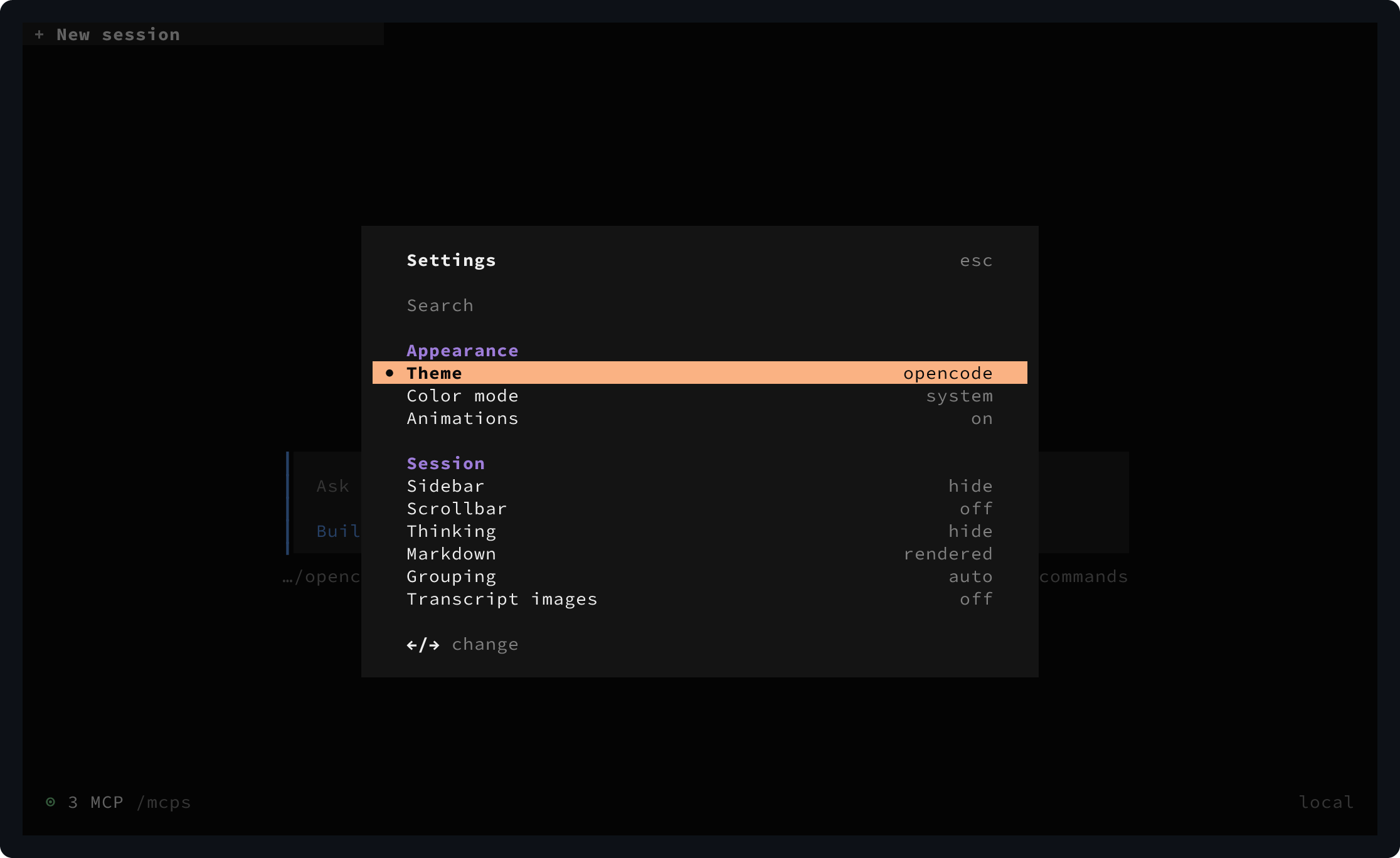
Press Ctrl+P, then select Open settings to change common settings from the TUI.
Configuration file
OpenCode stores CLI settings in one global file:
~/.config/opencode/cli.jsonWhen $XDG_CONFIG_HOME is set, OpenCode uses:
$XDG_CONFIG_HOME/opencode/cli.jsonThere is no project-local CLI settings file. Add the published JSON Schema for validation and autocomplete:
{
  "$schema": "https://opencode.ai/v2/cli.json"
}
OpenCode adds $schema when it creates or migrates this file. Unknown settings are rejected, and valid edits reload
while the TUI is running.
Inline config
Set OPENCODE_CLI_CONFIG_CONTENT to apply CLI settings from inline JSON:
OPENCODE_CLI_CONFIG_CONTENT='{"tabs":{"mode":"off"}}' opencodeOpenCode merges the inline settings over the global cli.json. Nested objects are merged, while arrays and scalar
values from the environment replace global values. Inline settings remain authoritative while the variable is set.
Appearance
Choose a theme, control interface motion, and override the terminal cursor:
{
  "theme": {
    "name": "tokyonight",
    "mode": "system"
  },
  "animations": true,
  "cursor": {
    "style": "block",
    "blinking": true
  }
}| Setting | Values | Description |
|---|---|---|
theme.name | string | Selects a built-in, custom, or terminal-derived theme. |
theme.mode | system, dark, or light | Follows the terminal appearance or locks the theme to one color mode. |
animations | boolean | Enables interface animations. |
cursor.style | block, underline, line, default | Sets the cursor shape. default preserves the terminal’s cursor shape. |
cursor.blinking | boolean | Controls cursor blinking. It has no effect when the style is default. |
See Theme for selecting and creating themes.
Input
Configure mouse capture, scrolling, editor context, pastes, and prompt image previews:
{
  "mouse": true,
  "scroll": {
    "speed": 3,
    "acceleration": false
  },
  "prompt": {
    "editor": true,
    "paste": "compact",
    "image_preview": false
  }
}| Setting | Values | Description |
|---|---|---|
mouse | boolean | Enables terminal mouse capture. |
scroll.speed | number, at least 0.001 | Sets the fixed distance per scroll input tick. |
scroll.acceleration | boolean | Accelerates repeated scrolling. When enabled, it takes precedence over speed. |
prompt.editor | boolean | Includes the active editor file or selection as prompt context. |
prompt.paste | compact or full | Shows large pastes as compact placeholders or as full text. |
prompt.image_preview | boolean | Shows image attachment previews above the prompt input. |
Sessions
Configure how full-screen TUI sessions are presented and where new sessions start:
{
  "session": {
    "sidebar": "auto",
    "scrollbar": false,
    "thinking": "hide",
    "grouping": "auto",
    "image_preview": false,
    "tps": true,
    "markdown": "rendered",
    "new_location": "launch",
    "permissions": "prompt"
  }
}| Setting | Values | Description |
|---|---|---|
session.sidebar | auto or hide | Shows the sidebar when space permits or always hides it. |
session.scrollbar | boolean | Shows the transcript scrollbar. |
session.thinking | show or hide | Shows or hides model reasoning by default. |
session.grouping | auto or none | Groups related transcript items or renders each item separately. |
session.image_preview | boolean | Shows user attachment and tool-result images in the transcript. |
session.tps | boolean | Shows output tokens per second in assistant footers. |
session.markdown | source or rendered | Shows Markdown syntax markers or conceals them in rendered content. |
session.new_location | launch or inherit | Starts in the TUI launch directory or inherits the active session location. |
session.permissions | prompt or autoaccept | Prompts for permission requests or accepts every request automatically. |
Tabs
Configure the persistent session tab strip:
{
  "tabs": {
    "mode": "auto",
    "scope": "cwd",
    "layout": "horizontal",
    "indicators": "status"
  }
}
The legacy boolean tabs.enabled setting remains supported: true is on and false is off. OpenCode reads it without rewriting the config file.
| Setting | Values | Description |
|---|---|---|
tabs.mode | auto, on, or off | Uses tabs automatically, always, or never. Auto hides them inside Herdr. |
tabs.scope | cwd or global | Keeps separate tabs per working directory or shares them globally. |
tabs.layout | horizontal or vertical | Places tabs in a horizontal strip or a vertical sidebar. |
tabs.indicators | status or numbers | Shows status icons or always shows tab numbers. |
Number indicators retain status colors and background animations. Ctrl+number shortcuts switch tabs in either indicator mode.
Diffs
Configure the initial diff scope and presentation:
{
  "diffs": {
    "source": "branch",
    "wrap": "word",
    "tree": true,
    "single": false,
    "view": "auto"
  }
}| Setting | Values | Description |
|---|---|---|
diffs.source | branch, committed, working, or turn | Sets the initial review scope. |
diffs.wrap | word or none | Wraps long lines at words or leaves them unwrapped. |
diffs.tree | boolean | Shows the diff file tree. |
diffs.single | boolean | Shows only the selected file patch. |
diffs.view | auto, split, or unified | Sets the layout. auto chooses from the available width. |
branch shows All branch and local changes, committed shows branch commits only, and working shows staged,
unstaged, and untracked changes. turn shows Last turn, the files the session changed in its latest turn; it
refreshes when the session finishes a turn and falls back to branch when /diff is not opened from a session.
In /diff, press d to change the scope or choose a comparison branch from Base. These in-view choices last until
the TUI exits and do not change cli.json.
Alerts
Enable system notifications and attention sounds independently:
{
  "attention": {
    "notifications": true,
    "sound": true,
    "volume": 0.4,
    "sound_pack": "opencode.default",
    "sounds": {
      "permission": "/home/me/sounds/permission.wav"
    }
  }
}| Setting | Values | Description |
|---|---|---|
attention.notifications | boolean | Shows system notifications, normally when the terminal is not focused. |
attention.sound | boolean | Plays attention sounds. |
attention.volume | number from 0 to 1 | Sets sound volume. |
attention.sound_pack | string | Selects the active sound pack ID. |
attention.sounds | object | Overrides sound files for default, question, permission, error, done, or subagent_done. |
An invalid or unreadable override falls back to the built-in sound for that event.
Terminal
Configure terminal integration:
{
  "terminal": {
    "title": true,
    "copy": "select"
  }
}| Setting | Values | Description |
|---|---|---|
terminal.title | boolean | Updates the terminal window title. |
terminal.copy | manual or select | Copies manually or immediately after selection. The platform default is manual on Windows and select elsewhere. |
Mini
The mini group controls opencode mini, the minimal interactive interface:
{
  "mini": {
    "thinking": "show",
    "tools": "hide",
    "shell_output": "hide",
    "turn_summary": "show",
    "footer": "show",
    "splash": "show",
    "work_spinner": "block-soft-slide",
    "mono": false,
    "replay": true,
    "replay_limit": 200
  }
}| Setting | Values | Description |
|---|---|---|
mini.thinking | show or hide | Shows or hides model reasoning. |
mini.tools | show or hide | Shows or hides tool calls and the assistant text that precedes them. |
mini.shell_output | show or hide | Shows or hides raw shell tool output. |
mini.turn_summary | show or hide | Shows or hides the agent, model, and duration summary in scrollback. |
mini.footer | show or hide | Shows or hides persistent activity, model, usage, and context details. |
mini.splash | show or hide | Shows or hides entry and exit splash banners. |
mini.work_spinner | spinner ID | Selects the work animation in the footer. |
mini.mono | boolean | Uses monochrome ASCII output. |
mini.replay | boolean | Restores session history on resume and terminal resize. |
mini.replay_limit | positive integer | Limits replay to the newest messages. The default limit is 200. |
Available spinner IDs are:
block-soft-slide  block-soft-sweep  block-low-comet  block-low-duet
block-shuttle     block-bridge      block-squeeze    small-toggle
square-toggle     grow-shrink       quadrant-orbit   crosshatch
density-wave      seed
Command-line mini replay flags override these settings for that invocation.
Keybinds
Override a command binding and the leader-key timeout:
{
  "keybinds": {
    "leader": "ctrl+x",
    "app.exit": ["ctrl+c", "ctrl+d", "<leader>q"],
    "prompt.paste": {
      "key": "ctrl+v",
      "event": "press",
      "preventDefault": false,
      "fallthrough": false
    },
    "help.show": false
  },
  "leader": {
    "timeout": 2000
  }
}| Setting | Values | Description |
|---|---|---|
keybinds.leader | binding value | Sets the key referenced by <leader> in other bindings. |
keybinds.<command> | binding value | Overrides the binding for one command ID. |
keybinds.*.key | key string or descriptor | Selects the key for an object binding. |
keybinds.*.event | press or release | Limits an object binding to one key event. |
keybinds.*.preventDefault | boolean | Controls whether the terminal’s default key behavior is prevented. |
keybinds.*.fallthrough | boolean | Allows lower-priority handlers to receive the same event. |
leader.timeout | positive integer | Sets how many milliseconds to wait after the leader key. |
A binding value can be a string, an array of alternatives, or an object. Use "none" or false to disable a binding.
See Keybinds for accepted key syntax, every command ID, and every default binding.
Plugins
Load terminal-only plugins in order:
{
  "plugins": [
    "-opencode.notifications",
    {
      "package": "./plugins/status",
      "options": {
        "compact": true
      }
    }
  ]
}| Setting | Values | Description |
|---|---|---|
plugins | array | Declares ordered enablement directives and external plugins. |
plugins[].package | string | Sets a package name, local path, or file URL. |
plugins[].options | object | Passes plugin-specific options to that plugin. |
See Plugins for package forms, local discovery, wildcards, and disable directives.
Debug and experimental
Enable diagnostics or opt in to a currently available experiment:
{
  "debug": {
    "devtools": false,
    "timing": false,
    "turn_tokens": "verbose"
  },
  "experimental": {}
}| Setting | Values | Description |
|---|---|---|
debug.devtools | boolean | Shows the DevTools debug bar. |
debug.timing | boolean | Shows time-to-first-draw diagnostics in the debug bar. |
debug.turn_tokens | boolean or verbose | Shows per-turn token usage; verbose also includes tool call inputs. |
experimental | object of feature IDs to booleans | Enables or disables experiments that may change or be removed without notice. |
Only use feature IDs currently listed by the TUI’s Experiments dialog. Unknown IDs have no effect.